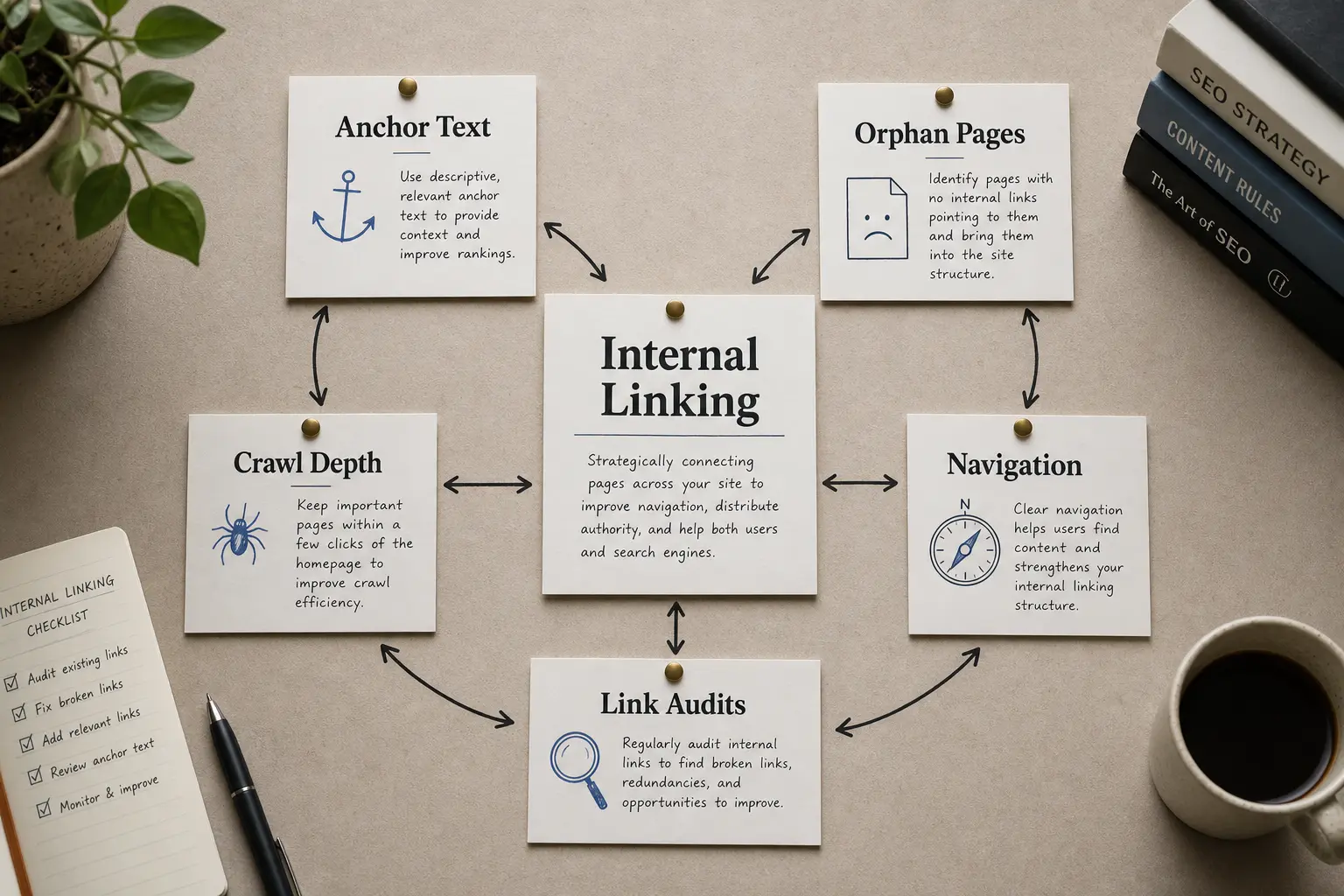
Internal linking is how you decide which of your pages matter most. When one page links to another with descriptive anchor text, it passes ranking signals (often called "link equity") and tells search engines the two pages are related. A site where every important page is reachable in a few clicks from the homepage, and where your money pages collect links from relevant supporting content, will crawl faster, get indexed more reliably, and rank its priority pages higher than a site with the same content and no deliberate link structure.
Key takeaways
- Internal links are one of the few search signals a site owner can change directly. They help search engines discover pages, interpret relationships between them and infer which pages the site emphasises.
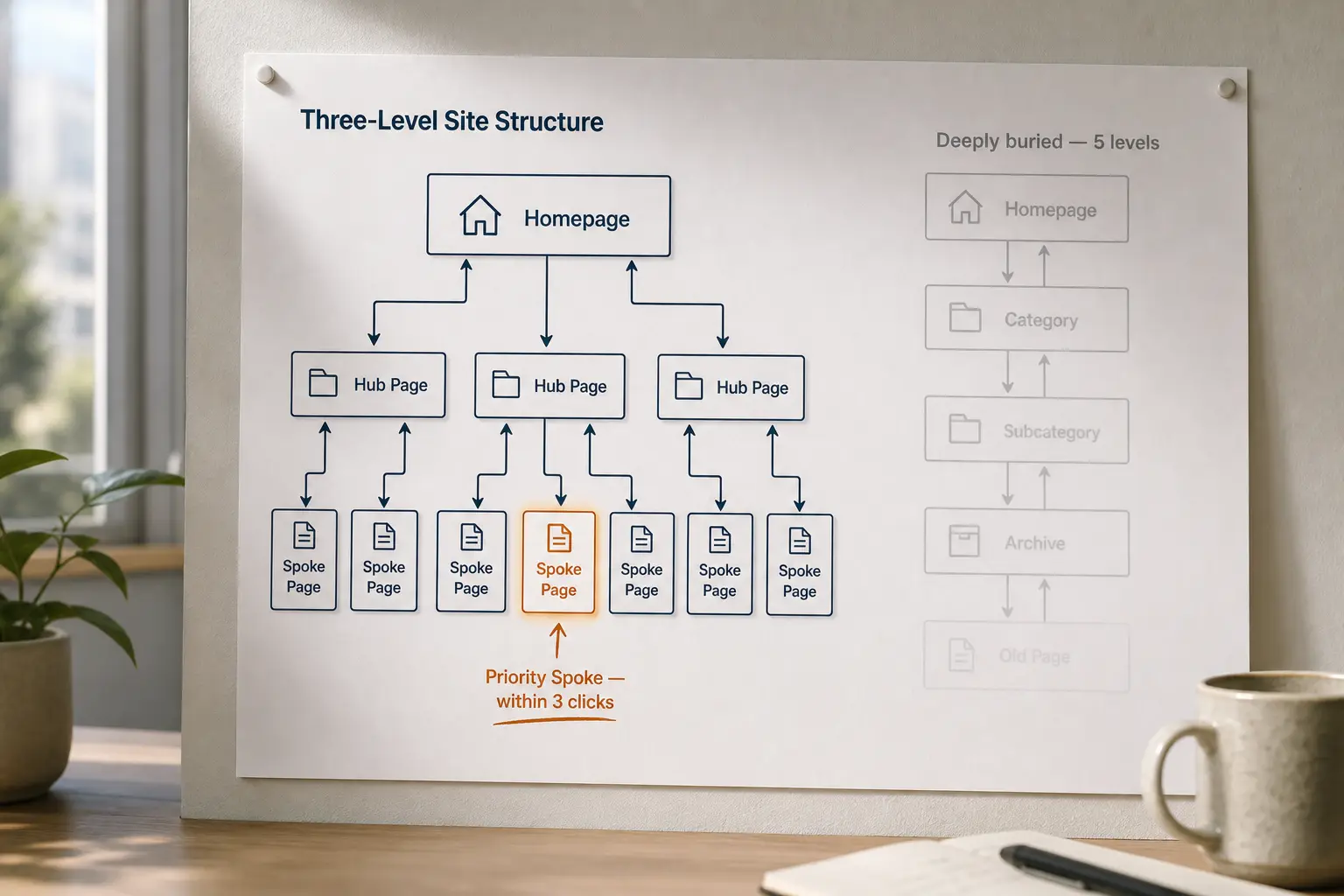
- A shallow, logical hierarchy (homepage → hub → spoke) beats a deep one: aim to reach any page within three clicks.
- Anchor text is a direct relevance signal, so use descriptive phrases, not "click here" or bare URLs.
- Hub-and-spoke (pillar plus cluster) is the most reliable structure for topical authority.
- Orphan pages (no internal links pointing to them) often go uncrawled and unranked; find and fix them.
What does internal linking actually do for SEO?
Internal linking works in a few ways at once. First, it spreads authority: a link from a well-linked page (your homepage, a popular guide) passes some of that page's standing to the page it links to. Second, it aids discovery and crawling: search bots follow links to find new and updated pages, so a page with zero internal links pointing at it may sit undiscovered for a long time. Third, it defines meaning through anchor text and context: linking the phrase "keyword research process" to a page tells Google that page is about keyword research far more directly than a body paragraph alone.
External backlinks depend on other sites. Internal links are easier to change because you control their destination, placement and anchor text. That makes them a practical on-page lever, but their effect still depends on page quality, crawlability, external authority and search intent.
How should you structure a site so authority reaches the right pages?
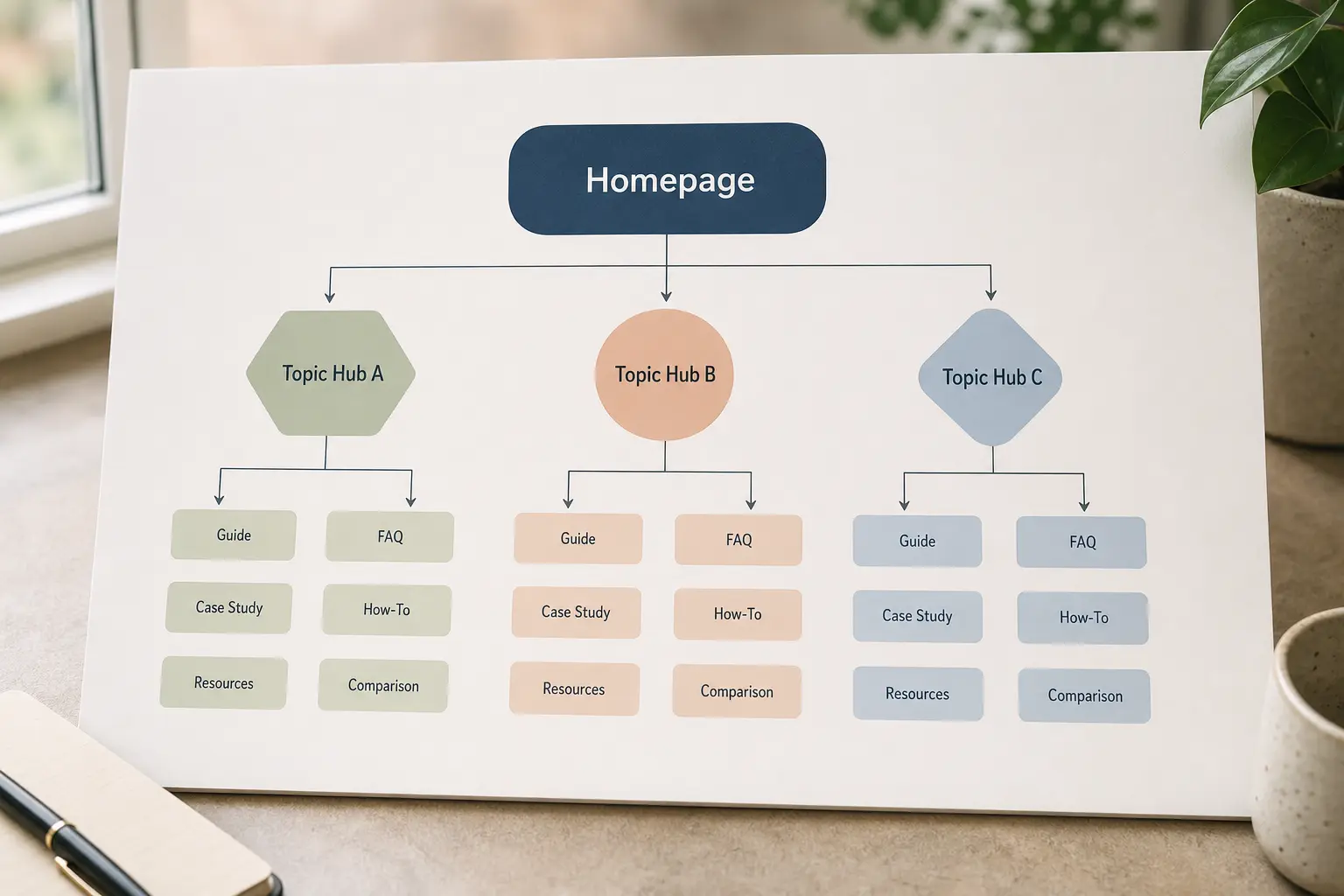
Keep important pages reasonably close to the site's main navigation and relevant hubs. The best depth depends on the site's size and catalogue, so use click depth as a diagnostic signal rather than a fixed rule. The homepage holds the most accumulated authority because it usually attracts the most external links and sits at the top of the navigation. From there, link down to your main hub or category pages, and from each hub link out to its individual spoke pages. Extra navigation levels can make a page harder to discover, especially when few other pages link to it. Review click depth alongside inbound-link count, link placement and the relevance of the pages supplying those links.
A practical target: any page on the site should be reachable within three clicks of the homepage. Google's crawlers treat click depth as a rough proxy for importance, so a page buried five clicks deep can read as low priority even if the content is strong. Flatten the path by linking priority pages directly from high-authority hubs rather than routing everything through long breadcrumb chains.
The structure looks like this in practice:
1
- Page role: Homepage
- Links down to: Main hubs, top money pages
- Typical authority: Highest
2
- Page role: Hub / category / pillar
- Links down to: Related spokes, sibling hubs
- Typical authority: High
3
- Page role: Spoke / guide / service
- Links down to: Related spokes, back up to hub
- Typical authority: Moderate
Links back to the hub help readers return to the broader topic, while carefully chosen links between spokes support related tasks. Add them where they clarify the topic path; do not assume every spoke needs an identical reciprocal pattern. Done well, authority circulates within a topic instead of leaking out to unrelated corners of the site.
What is hub-and-spoke (pillar and cluster) structure?
Hub-and-spoke is a content architecture where one broad "hub" page covers a topic at a high level and links out to several narrower "spoke" pages, each covering one sub-topic in depth, with every spoke linking back to the hub. It is the most reliable way to build topical authority because it concentrates internal links around a subject and gives search engines an unambiguous map of how your pages relate.
SEO 24x7's learning hub and related guides illustrate the intended model. The Learn SEO structured path can serve as the pillar, with focused guides on keyword research, Core Web Vitals and internal linking as spokes. Before stating that every spoke links back to the hub and across to relevant siblings, confirm those relationships with a full crawl and add any missing links.
A couple of habits keep a cluster clean. Link spokes to each other only where the connection is real, not to hit a link count. And keep each spoke on its own distinct sub-topic, so you are not building two pages that compete for the same search and split the authority you are trying to concentrate.
How do you write anchor text that helps rankings?
Use descriptive, keyword-relevant anchor text that names what the target page is about. The words inside a link are one of the clearest relevance signals a search engine reads, so generic anchor phrases like "click here", "read more", or a bare pasted URL waste the signal entirely. If a page is about anchor text, the link pointing to it should contain a phrase like "anchor text for internal links", not "learn more".
Use these checks when reviewing internal anchor text:
- Describe the destination accurately. Use anchor text that accurately describes the destination in its sentence. Repetition is not automatically a problem; revise anchors when they become awkward, misleading or unnaturally inserted, rather than varying them to meet a quota.
- Match the anchor to the target, not the source. The anchor should describe where the link goes, so a reader knows what they will get before clicking.
- Make the link self-explanatory. Make the link understandable on its own, while keeping the surrounding sentence relevant. Search engines can use both the anchor and its context, and readers should know what they will reach before clicking.
- Keep it readable. An anchor stuffed with three keywords reads as spam to both people and crawlers. One clear phrase is stronger than a keyword pile.
Anchor text guidance for internal links differs from external-link caution. Because you control every internal anchor, over-optimisation is a genuine risk: if every link to a page uses the identical exact-match phrase, tone it down toward natural variation.
What are orphan pages and how do you find them?
An orphan page is a page with no internal links pointing to it. Because crawlers discover pages by following links, an orphan can go undiscovered, uncrawled, and unindexed even when it sits in your sitemap. It is one of the most common and most fixable internal-linking faults on a growing site.
To find orphans, compare two lists: every URL in your XML sitemap (or a full crawl of your site) against every URL that receives at least one internal link. Anything in the first list but not the second is orphaned or near-orphaned. A crawl-based site auditor produces both lists automatically; on a small site you can trace it by hand from the navigation and body links.
To fix an orphan, add at least one contextual link to it from a relevant, already-linked page, ideally the hub it belongs under. The reverse problem is worth checking too: "dead-end" pages that receive links but link nowhere themselves, which trap crawl flow and give readers no next step.
How many internal links should a page have, and where do they belong?
There is no useful universal link limit. Each link should help a reader or support the site's hierarchy; excessive navigation and repetitive contextual links can obscure which destinations matter most. Google may use placement, surrounding text and page context when interpreting links, but there is no published weighting formula. Put important links where they are relevant and likely to be used, rather than assuming that a particular position guarantees more ranking value.
Your most important internal links belong inside the body of related content, written into sentences with descriptive anchors, rather than parked in a footer.
A practical internal-linking checklist
Work through this when auditing or building out a site's link structure:
- Map your hubs and spokes. Every spoke belongs to exactly one clear hub.
- Confirm every priority page is reachable within three clicks of the homepage.
- Link every spoke up to its hub and across to genuinely related siblings.
- Rewrite generic anchors ("click here", bare URLs) into descriptive phrases.
- Run a crawl and list orphan pages; add at least one contextual link to each.
- Check that money and priority pages collect links from your strongest supporting content.
- Vary anchor text to the same target so no single exact-match phrase dominates.
- Remove or consolidate links to pages you don't want competing with each other.
Score each candidate link from 0 to 2 on three criteria: how important the target is, how relevant the source page is, and how useful the link is to a reader, where 0 = absent, 1 = partial and 2 = strong. The point is to make the decision visible rather than to produce a single number. The table below is a hypothetical worked example, not real crawl data:
Core Web Vitals guide
- Proposed target: Keyword research guide
- Importance: 2
- Relevance: 0
- User usefulness: 0
Core Web Vitals guide
- Proposed target: Internal linking guide
- Importance: 2
- Relevance: 2
- User usefulness: 2
Anchor text section
- Proposed target: Keyword research guide
- Importance: 1
- Relevance: 1
- User usefulness: 1
The Core Web Vitals-to-internal-linking proposal needs a specific contextual reason before it is added. Keep it only if the source passage discusses crawl paths, site architecture or how users reach performance guidance; otherwise, choose a source page with a closer topical connection. The top row scores zero on relevance and usefulness. Keyword research has little to do with Core Web Vitals, so the link would exist only to pass authority, and it should stay out. The bottom row is the borderline case. The connection is plausible but weak, and the same target may already be linked from a more relevant spot; here placement, whether the destination is already linked nearby, and real reader intent decide it. Record the source URL, target URL, current anchor, proposed anchor and reason for each link you keep, so the audit can be reviewed later.
Use the page check tool to inspect an individual URL's on-page structure. It does not replace a full crawl for finding orphan pages, measuring click depth or confirming site-wide inbound-link counts. The tools hub collects the other free checks.
Frequently asked questions
Do internal links pass as much value as external backlinks?
No single internal link carries the weight of a strong external backlink, but you can place unlimited internal links with full control over anchor text and target, which makes them collectively powerful and far more actionable than chasing backlinks.
Should internal links open in a new tab?
Usually, no. Open internal links in the same tab unless there is a specific user need for a new one. Unexpected new tabs can disrupt keyboard and assistive-technology users, and opening a new tab provides no crawling benefit.
Can I have too many internal links on one page?
A page can become less useful when links are repetitive, irrelevant or visually overwhelming, but there is no universal safe count. Remove links that duplicate the same destination without helping readers, and retain links that support the task or clarify the site's structure.
Does nofollow help me control internal link flow?
Not usefully anymore. "Sculpting" authority by adding nofollow to internal links stopped working the way it once did; the flow is redistributed rather than saved. Control your structure by choosing which links exist, not by nofollowing internal ones.
Choose the next action from your audit
If one page has no relevant incoming links, add a contextual link from its nearest hub first. If an entire topic is fragmented, map the hub and spokes before editing individual anchors. Use the SEO 24x7 page check tool for a single-page review, continue through the structured learning path, then take unresolved architecture questions to the community.